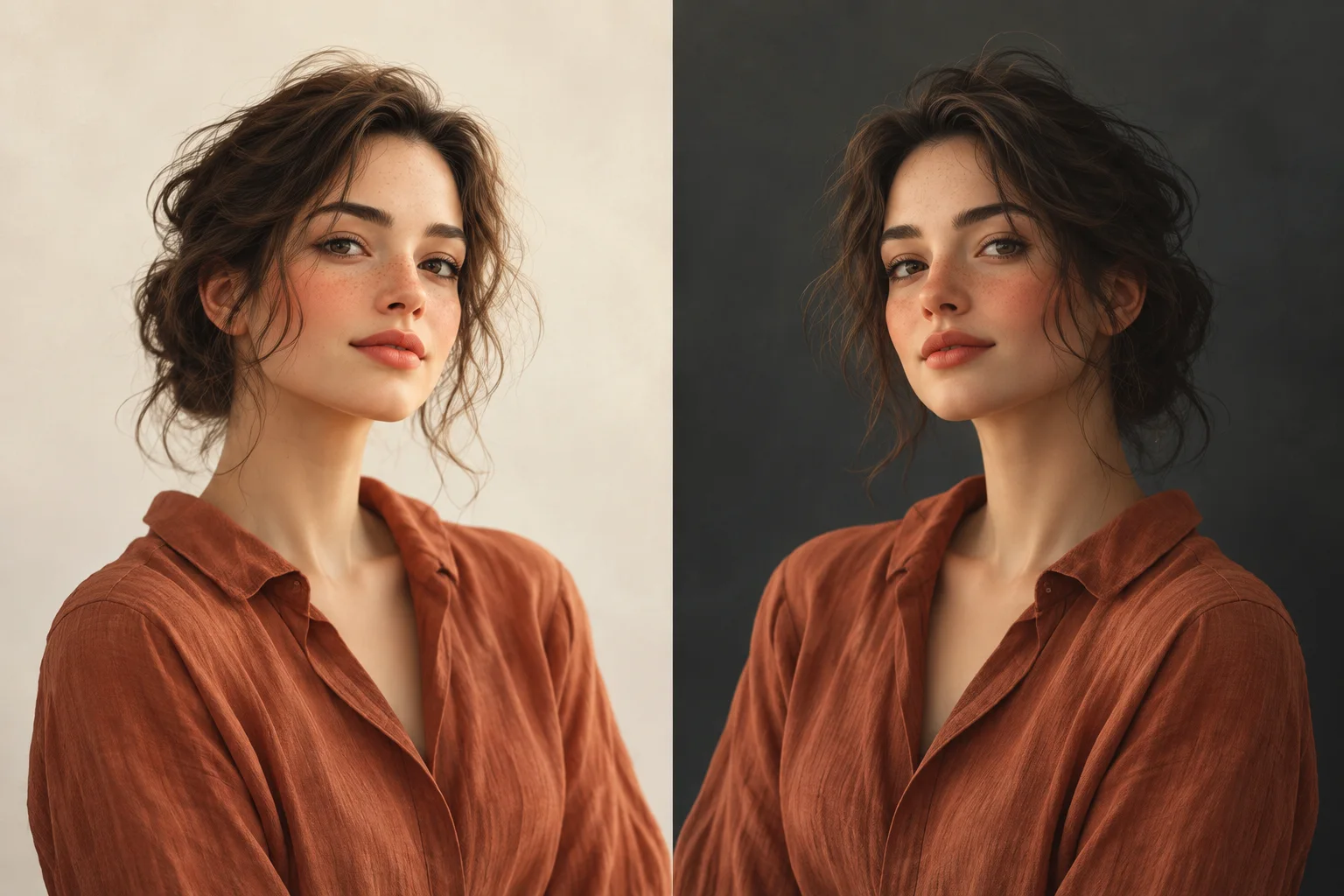
Before you start
By LookScene editorial team · Updated September 30, 2026. AI-assisted editorial guide; examples and cover images are illustrative, not product test results.
Choosing between a light and a dark background for your professional headshot is not a matter of prestige or rigid industry rules. It is fundamentally an exercise in tonal contrast and edge legibility. The right backdrop creates clean visual separation around your hair and shoulders, helping you assess whether the silhouette remains legible whether viewed on an executive profile page or compressed into a tiny smartphone notification icon.
Neither white nor black is universally superior. The ideal background value depends on how your specific hair shade and clothing tones interact with the backdrop on the exact same portrait. By evaluating contrast boundaries systematically, you can select a background that highlights your natural features without producing unnatural edge halos or swallowed clothing contours.
The Mechanism: Tonal Contrast and Thumbnail Legibility
Visual separation in a portrait relies on tonal difference—the relative brightness between the edge of your subject (hair and clothing) and the backdrop behind it. According to Nikon's portrait techniques guide, simple, non-distracting backgrounds serve the vital role of keeping visual attention centered directly on the individual rather than competing for focus.
When backdrop luminance matches the subject's perimeter too closely, edge contrast collapses. This loss of definition becomes pronounced at small display scales:
- Full-Desktop Viewing: The eye easily distinguishes subtle texture differences between dark wool fabric and a charcoal wall.
- Mobile Feeds and Directory Thumbnails: Reduced pixel dimensions eliminate subtle micro-textures. Low-contrast boundaries blend together, causing shoulders to disappear and hair volume to flatten against the perimeter.
Checking tonal differences at important boundaries helps assess legibility across social platforms, company directories, and team bios. If you captured your original image in a home setting, review our guide to setting up a professional headshot at home to ensure balanced base lighting before testing alternative backdrop shades.
Evaluating Subject Boundaries: Hair and Clothing
Achieving clean separation requires assessing two distinct zones: the upper boundary (hair and head shape) and the lower boundary (collars, lapels, and shoulders).
Hair Strands and Upper Edge Contrast
Hair edges are rarely solid; they consist of semi-translucent wisps, soft curls, and fine individual strands:
- Dark Hair on Dark Backdrops: Rich brown or black hair placed against navy, dark slate, or black backgrounds often recedes into the backdrop, losing perception of volume and haircut structure depending on the actual lighting and backdrop; a rim light is one option, not a requirement.
- Light or Fine Hair on Light Backdrops: Blonde, silver, or light gray hair against stark white or bright cream backdrops can visually bleed into the background, washing out the natural crown silhouette.
- Mid-Tone Flexibility: Chestnut, auburn, and medium brown hair generally maintain adequate contrast against both off-white and medium-dark backdrops.
Clothing Silhouettes and Lapel Separation
Clothing fabrics present broader, flatter surfaces where value collisions occur abruptly:
- Dark Suiting: Charcoal, black, and deep navy jackets risk blending entirely into low-key studio backdrops, turning defined shoulders into a blocky, undifferentiated mass.
- Light Blouses and Shirts: Crisp white or pastel garments risk losing their shoulder lines when set against high-key white backgrounds.
- If you are evaluating wardrobe options across multiple backdrops, explore how to compare outfit colors on the same photo to preserve collar and lapel structure.
Contrast Decision Matrix
Use this matrix to identify potential contrast bottlenecks based on your hair and clothing tones:
| Subject Combination | Light / Off-White Backdrop | Medium / Neutral Gray Backdrop | Dark / Charcoal Backdrop |
|---|---|---|---|
| Dark Hair + Dark Clothing | High edge separation. Defines hair volume and shoulder contours cleanly. | Balanced contrast. Soft, modern look with clear boundaries for both hair and suiting. | High risk of edge loss. Suiting and hair merge into background in some lighting setups. |
| Light/Gray Hair + Dark Clothing | Variable separation. Shoulders stand out sharply, but fine hair strands may fade into the white canvas. | Possible starting option. Keeps hair perimeter legible while anchoring shoulders. | High edge separation. Accentuates blonde or silver hair; suiting contours require careful inspection. |
| Dark Hair + Light Clothing | Variable separation. Hair shape remains crisp, but light collars and shoulders risk washing out. | Possible starting option. Defines both hair volume and light clothing edges evenly. | High edge separation. Collars and shoulders stand out crisply; dark hair edges need checking; no rim light is universally required. |
| Light Hair + Light Clothing | High risk of washed edges. Entire silhouette risks low definition; requires neutral tint. | Possible starting option. Provides necessary tonal foundation for both hair and wardrobe. | High edge separation. Strongest contrast overall, creating a bold, graphic silhouette. |
4-Step Workflow for Comparing Background Values
To evaluate backdrop options objectively, compare variations using the exact same capture, crop, and facial expression:
- Lock Your Source Portrait: Select a clear original or high-quality export with sharp focus along hair margins and collar seams. Avoid changing your posture, facial expression, or lighting angle between tests.
- Generate Identical Backdrop Variations: Create side-by-side versions shifting solely the background luminance—for example, soft off-white, neutral mid-gray, and deep charcoal.
- Conduct the Thumbnail Squint Test: Scale the preview down to the actual target size; 100×100 pixels is only an illustrative small-preview test or squint at your screen from an arm's length away. Verify whether your shoulder slope and head outline remain immediately recognizable.
- Inspect Boundary Transitions at Full Resolution: Zoom into the interface where hair strands meet the backdrop. Confirm that fine textures remain intact rather than getting blurred or surrounded by artificial halos. Consult our AI portrait quality checklist for detailed edge-inspection criteria.
Worked Example: Evaluating a Dark Blazer and Brunette Portrait
Consider a hypothetical scenario: Jordan, a management consultant, has dark brown wavy hair and wears an unbuttoned charcoal wool blazer over an off-white collared shirt. Jordan wants an updated headshot for professional networking and internal company communication.
- Option A (Stark Black Backdrop): The charcoal blazer merges into the background below the collarbone. While the white shirt collar pops, the outer shoulder seams disappear, making Jordan appear disembodied at thumbnail sizes. The dark brown curls along the temples also lose definition against the pure black canvas.
- Option B (Pure White Backdrop): The blazer and hair contours stand out with extreme clarity. However, the bright white background creates an intense contrast dynamic that draws attention away from Jordan's eyes and toward the perimeter edges. The off-white shirt collar also appears slightly yellowed next to pure white.
- Option C (Muted Slate / Medium-Warm Gray): The mid-tone gray sits precisely between the dark suiting and the light collar. Jordan's dark hair maintains natural edge clarity, the charcoal blazer retains its shoulder silhouette, and the overall portrait achieves balanced contrast across both full-size and mobile displays.
Common Pitfalls and Edge Artifacts
When evaluating or editing backdrops, avoid these frequent assumptions:
- The "Dark Hair Always Demands White" Myth: While white provides stark contrast, a bright background changes perceived contrast; changing only background pixels does not physically re-expose the face. Soft warm gray, taupe, or muted off-white often yield a more natural transition.
- The "Dark Backdrops Guarantee Authority" Assumption: Black or deep navy does not automatically convey executive presence. If the backdrop swallows your clothing, inspect whether the subject remains legible; no personality or authority judgment follows from the shade alone.
- Edge Halos from Digital Swaps: Replacing backgrounds digitally can cause noticeable artifacts. When a portrait originally photographed against a beige wall is placed onto a dark navy canvas, tiny gaps between hair strands often retain residual light pixels, creating a visible "fringe" or glowing halo. Always inspect hair margins closely against your raw source file.
Inspecting Previews with LookScene
LookScene provides photo-based style previews designed to help you visualize different background tones, lighting moods, and context settings on your existing portrait. Generated previews may alter facial features, hair or clothing even when only a background change is requested. Compare each with the original; do not treat identity preservation as guaranteed.
Use LookScene previews to test subtle light, neutral, and dark background values side by side against your original photograph. Once you identify which tonal range keeps your silhouette legible and your hair natural, you can move forward with a headshot that represents you clearly at the intended destination, after checking its requirements.
Style options to compare
Use these illustrated directions to plan what to try. They are not verified before-and-after results; inspect the review checklist on each page.
- Clean studio portrait — Compare the eyes, jaw, hairline and skin against the original. Crop for your intended profile size after reviewing.
- Warm studio — Check that warm background color does not unnaturally tint the face.
- Garden light — Inspect hair edges and ensure foliage does not cross the face.